Plot Board
A grid of plot lines against chapters: rows are story arcs, columns are chapters, and a card in a cell is a beat that lands there. Find it under Analysis in the binder sidebar, or in the Analysis menu.
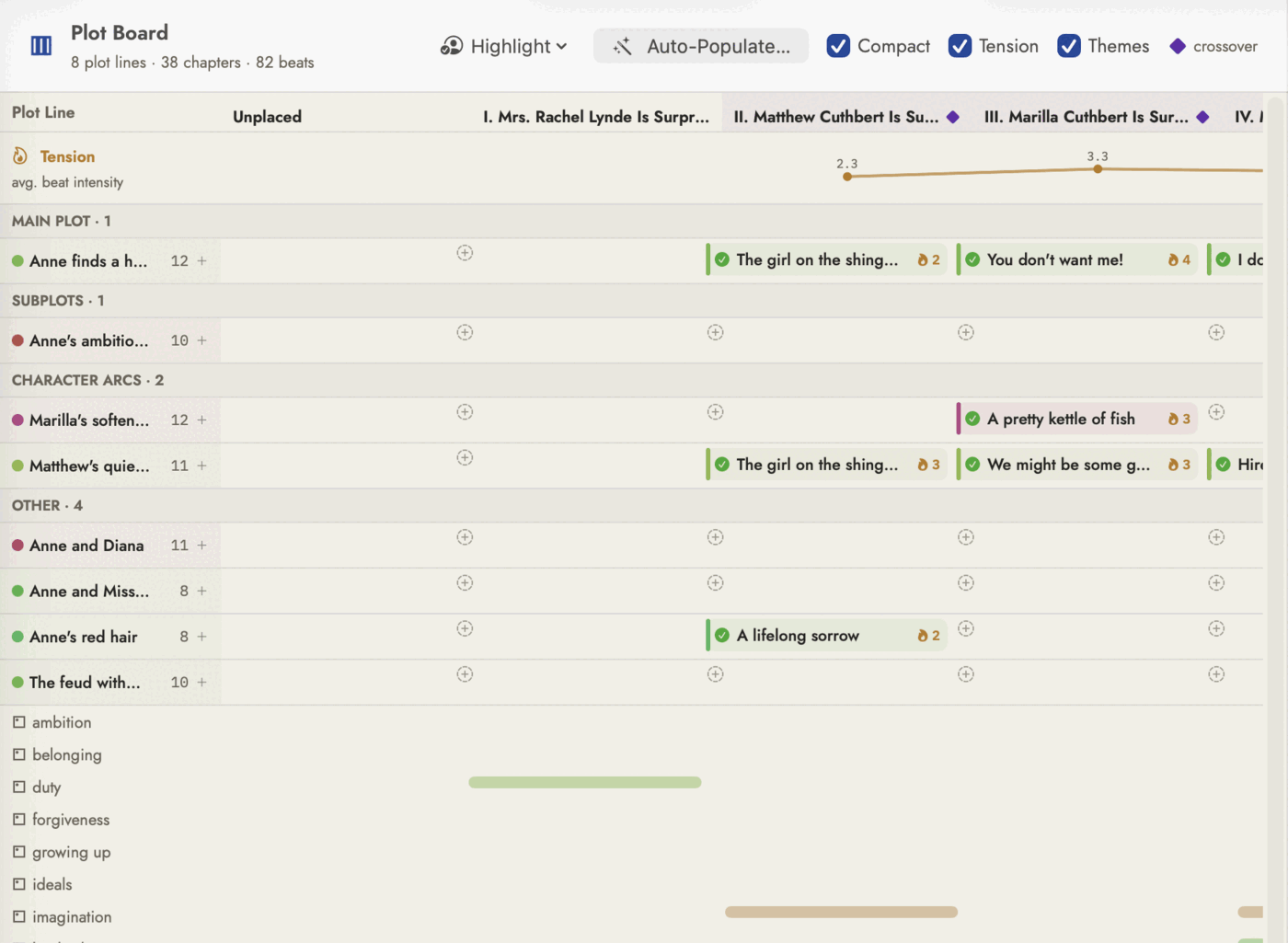 Every row here is a story arc — the number beside its
name is how many beats it has in total, not just in view.
Every row here is a story arc — the number beside its
name is how many beats it has in total, not just in view.
The grid
A row is a Story Arc record, never a Plot Item — Loose Ends and Spine Report read plot items and threads their own way; this board is arcs and their beats only (Themes, below, is the one other kind of row the board draws, and it is not a plot line either). The number beside a row's name is that arc's total beat count across the whole book, not just what's visible in the columns currently on screen.
A column is a chapter, sorted the same way the binder orders them — every chapter in scope, including front and back matter. Nothing stops a beat from being dropped on an Author's Note or a title page's own column; if that's not where you meant it, drag it off. The one column that isn't a real chapter is the leading Unplaced column — beats with no chapter Sgeulai can resolve collect there, whether because nobody has placed them yet or because their only link is a scene that isn't itself filed under a chapter.
The manuscript scope — which book's arcs and chapters are on the board — follows the window's own Working on picker in the main toolbar, the same as every other analysis tool. There's no separate scope control inside Plot Board itself.
Cells, cards and beats
Clicking the + in an empty cell doesn't open a draft to discard — it creates a real beat named "New Beat" on the spot, files it under that arc and that chapter, and opens its editor. Closing the editor keeps the beat; if it isn't wanted, Delete Beat inside the editor is the way to undo it, not simply dismissing the sheet.
A card shows a coloured accent bar in its arc's own colour, a completion mark once the beat is filled in, and a small flame badge when its intensity is set. A cell holding more beats than fit folds the rest behind a "+N more" button rather than growing the row — nothing placed on the board is ever hidden, only folded one click deeper. Clicking an existing card opens the same editor: title, type, summary, intensity, the state either side of the beat, and Placement & Links — chapter, scene, event, location and characters, including a second, non-drag way to move it to a different chapter. A Crossover section there lists whichever other arcs' beats share this one's chapter.
Moving a beat
Dragging a card to a different chapter genuinely repins it — it isn't a visual rearrangement. Drop it in a different arc's row and it reparents to that arc too, landing at the end of the row it joins. This is the same chapter field Spine Report reads for its own beat chips, so a drag here shows up there immediately.
Auto-Populate…
A confirmation dialog first, then two things happen, arc by arc, entirely from the Story Bible's own existing links — nothing is read from the manuscript's prose, and no AI is involved:
- Empty arcs get seeded. An arc with no beats at all gets one beat per scene already tagged as advancing it, named from the scene and placed under that scene's chapter.
- Unplaced beats get placed. For a beat with no chapter yet, Sgeulai tries its linked event's scene, then a chapter where one of its tagged characters actually appears, and only falls back to spreading it proportionally along the arc's own span if neither answer exists.
It never touches a beat that already has a chapter — seeding only fires on an arc with zero beats, and placement only fires on one with none. Drag anything that lands wrong — that's the dialog's own closing line, and it means what it says: this is a starting layout, not a final one.
Highlight
A menu of every character tagged on any beat currently on the board — absent entirely if none are. Choosing one dims every card that doesn't name them and outlines the ones that do, so you can trace one character's own thread across every arc at a glance without hiding anything else.
Compact
Shrinks row and header height, drops each card to a single line (its usual detail moves into the tooltip instead of disappearing), and lowers how many beats a cell shows before folding the rest. Column width doesn't change. Unlike Tension and Themes below, Compact is remembered across launches — a big board stays compact every time you open it, rather than resetting each time you switch tools and come back.
Tension
A curve pinned above the grid, one point per chapter: the average intensity (1–5, the same flame rating set inside a beat's own editor) of every beat that lands there, across every arc currently on the board. A beat with no intensity set doesn't count as a zero — it's left out of the average — so a chapter where nobody has rated anything simply leaves a gap in the line rather than drawing a false dip.
Themes
Its own block of rows beneath the arcs — one per Theme record, and only for a theme actually referenced somewhere; a theme nobody has linked to yet stays off the board even with this checked. Presence per chapter comes from wikilinks already found in the prose, not a field you set by hand, so it costs nothing extra to toggle — the scan it draws from runs continuously in the background either way.
Crossover
The small purple diamond beside a chapter's own name in its column header marks a chapter where two or more different arcs each have a beat — hover it to see which. It's a fact about that chapter, not a filter or a toggle; the legend swatch beside the other checkboxes is just naming the colour, not a control of its own.