Notes & citations
A footnote where the caret is, a citation picked rather than typed, and a bibliography brought in from the manager you already use. All of it is Markdown in your prose, so nothing here is a format only Sgeulai can read.
Footnotes and endnotes
Four commands, all on the Format menu:
| Command | What it does | |
|---|---|---|
| Insert Footnote | ⌃⌘8 | Writes a marker —
[^fn1] — at the caret, and a matching [^fn1]: line
at the end of the section, with the caret left in it. |
| Insert Endnote | ⌥⌃⌘8 | The same, with a
doubled caret: [^^en1]. That second caret is the whole
difference between a footnote and an endnote. |
| Check Footnotes… | ⌃⇧⌘8 | Reports markers with no definition and definitions nothing refers to. A clean section says Footnotes look good — every reference has a definition and every definition is used. |
| Insert Citation… | ⌃⌘9 | Opens the picker below. |
You can also write them by hand: text[^1] with
[^1]: the note, or inline as ^[the note]; a second
caret makes either an endnote. Footnotes are numbered 1, 2, 3 and
endnotes i, ii, iii when the book is previewed or exported,
whatever labels the markers carry — the labels are for you.
Citing a source
Insert Citation… lists every Source record that has a
citekey. Filter by citekey, title or author, fill in Page or other
locator if you want one, and the citation goes in at the caret as
[@montgomery1908] or [@montgomery1908, p. 33].
Its Zotero tab searches your Zotero library instead, and
files the reference as a Source record as you cite it. For several works in
one citation, write it out: [see @citekey, p. 33; @other, chap.
2].
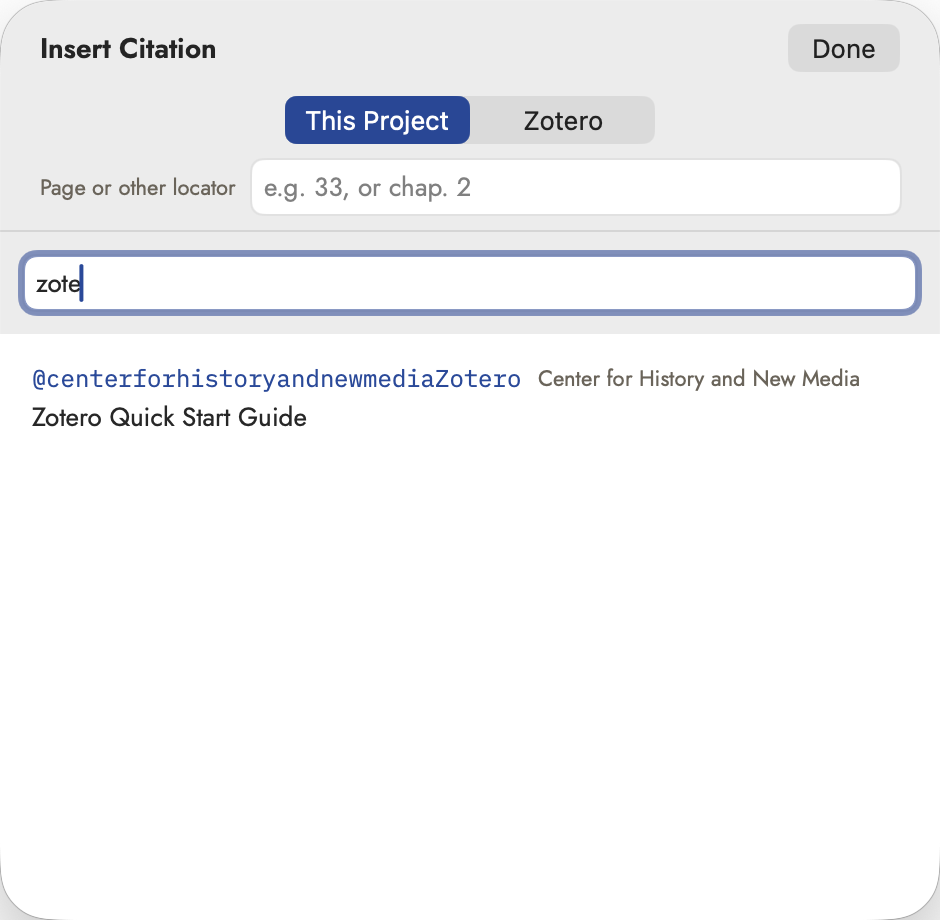 The citekey is shown first, and in the face your
manuscript will hold, because the citekey is what gets written in.
The citekey is shown first, and in the face your
manuscript will hold, because the citekey is what gets written in.
Citekeys are part of the Source record — see The Story Bible. A record you typed yourself has none until you give it one, and until then it isn't in the picker.
Bringing a library in
Three commands on the toolbar's Import menu:
- Import Bibliography (BibTeX / CSL-JSON / EndNote XML)… makes one Source record per reference, and says how many it added. EndNote XML is what EndNote exports, and what Bookends writes for File ▸ Export References. Most references in an EndNote XML file carry no citekey, so Sgeulai gives each one its own.
- Link a Synced Bibliography File… remembers a file a manager keeps up to date — Bookends' File ▸ Create Synced Text File is the usual one. Link it once and the sources can be brought up to date from it later.
- Refresh Linked Sources re-reads both kinds: Zotero, and any linked file. With nothing linked it says so rather than pretending to work.
See Importing and exporting for the rest of that menu.
How Sgeulai reaches Zotero
With Zotero running on this Mac, it finds the library by itself — nothing to set up. Zotero has to be willing: if it answers "Zotero is running, but doesn't let other apps read it", turn on Settings ▸ Advanced ▸ Allow other applications on this computer to communicate with Zotero in Zotero itself.
With Zotero closed, or from an iPad, it needs a Zotero Web API key — Settings ▸ Writing, and see Settings reference. The key is kept in your Keychain and follows your iCloud account, so it only has to be pasted once.
How they come out
Export ▸ Notes & Citations… holds the settings, and they belong to the project rather than the Mac, so they travel with the book to the iPad.
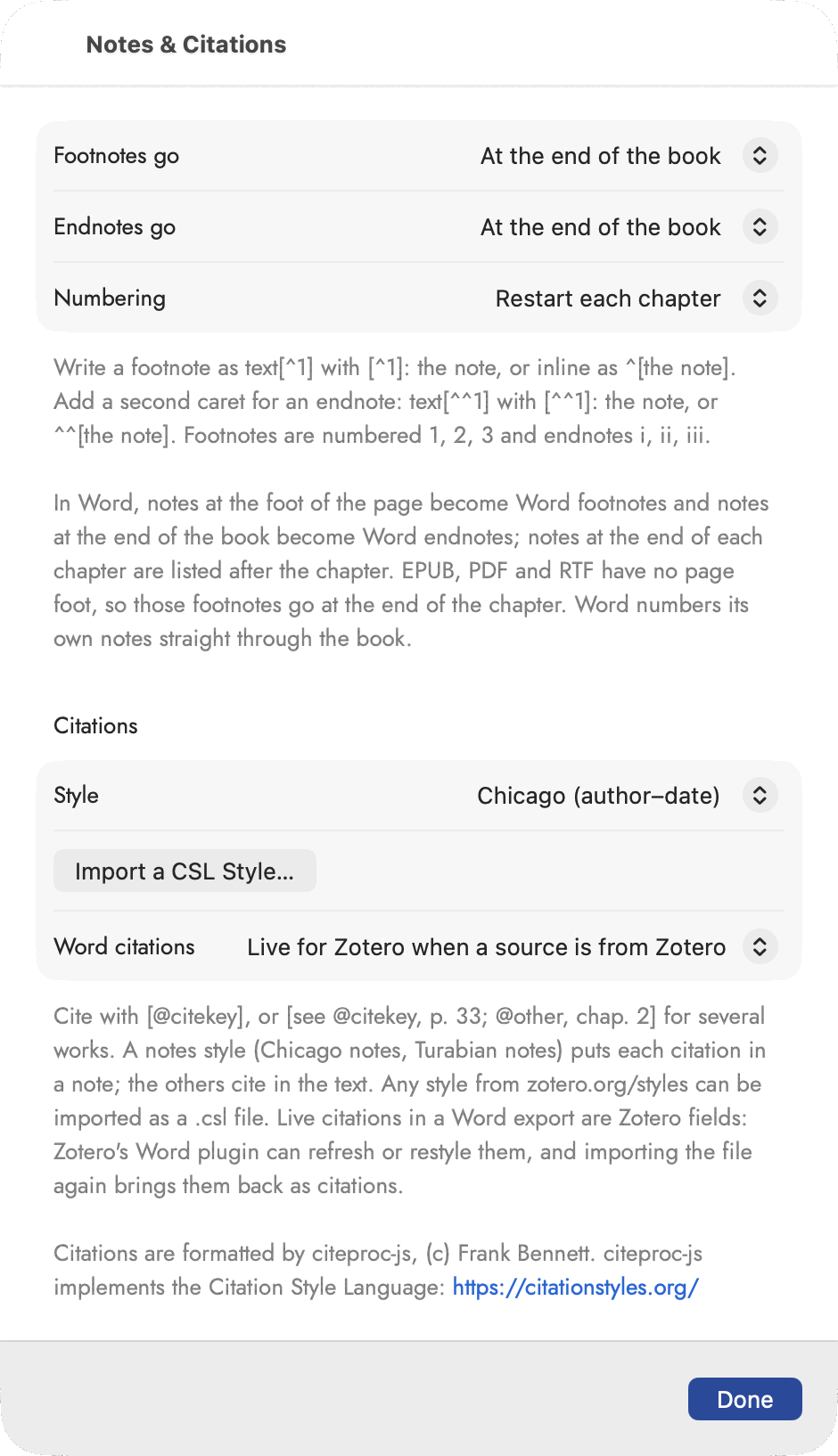 Both kinds are set in one place because the choice only
means anything as a pair.
Both kinds are set in one place because the choice only
means anything as a pair.
- Footnotes go at the foot of the page, at the end of each chapter, or at the end of the book. Endnotes go at the end of a chapter or of the book.
- Numbering restarts each chapter or runs straight through the book.
- Style is the citation style — Chicago, APA, MLA and the
rest — and Import a CSL Style… takes any
.cslfile from zotero.org/styles. A notes style (Chicago notes, Turabian notes) puts each citation in a note; the others cite in the text, with a References list built from the works actually cited. - Word citations decides what a DOCX export carries: live Zotero fields, which Zotero's own Word plugin can refresh or restyle and which come back as citations if the file is imported again, or plain text.
In a Word export, notes set to the foot of the page become Word footnotes and notes set to the end of the book become Word endnotes; notes set to the end of each chapter are listed after that chapter, since Word numbers its notes straight through. EPUB, PDF and RTF have no page foot, so footnotes there go at the end of the chapter.