The style check
A second reader for the prose, looking for the habits editors circle: the word used three times in a paragraph, the sentence made of glue, the verb that could be stronger, the phrase everyone has read before. It points and explains. It never changes a word.
It runs on this Mac, uses no AI, and reads nothing but the section in front of it. It is rules and word lists, with Apple's language tools working out which word is a verb and what its plain form is — so "began to" and "begins to" are the same finding, and "a pretty girl" is not filler where "pretty cold" is.
The Style tab
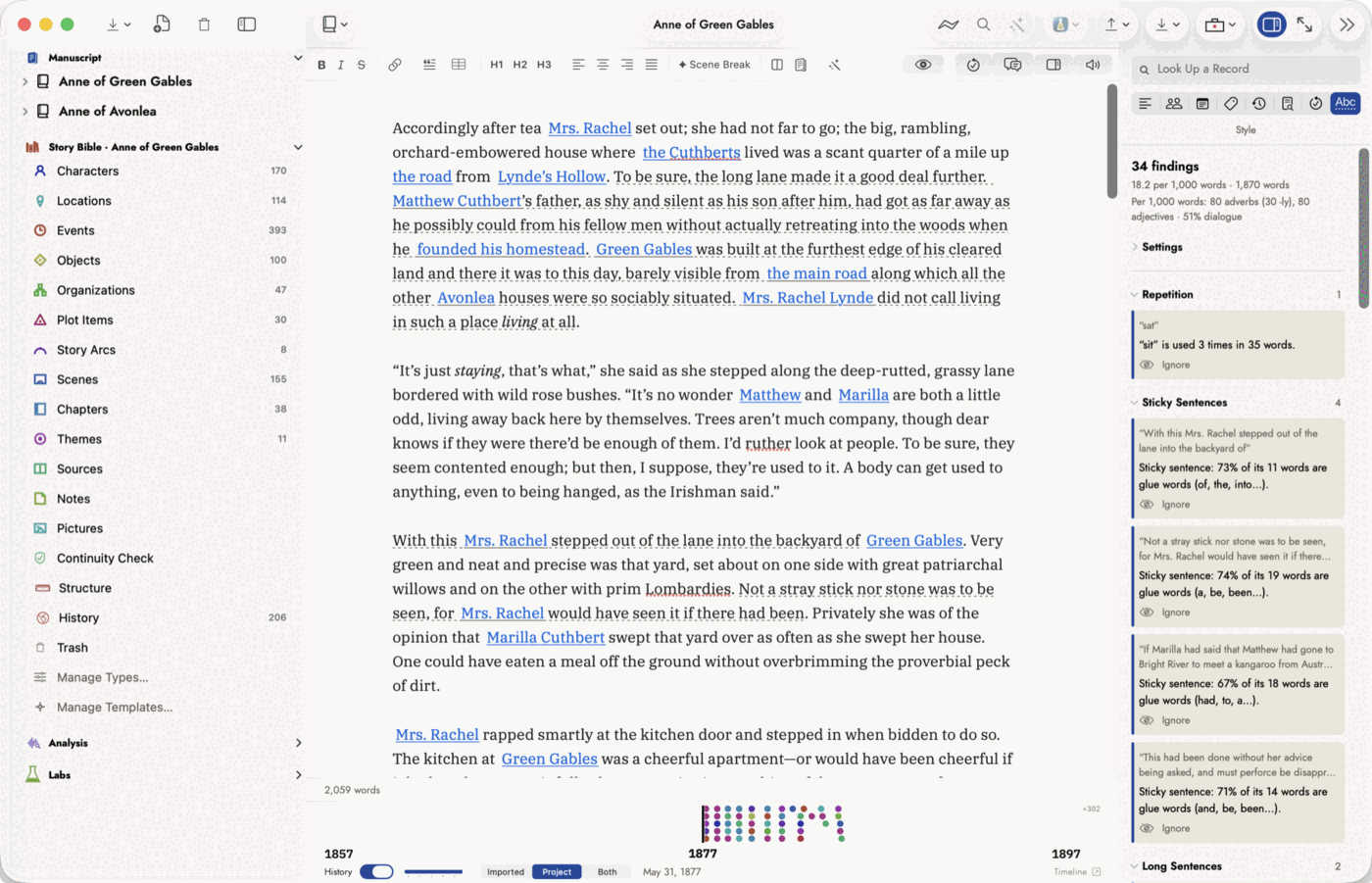
Open a chapter or scene, show the inspector, and choose the Style tab, the last icon in the row. The check runs while the tab is showing and catches up a moment after you stop typing; switch to another tab and it stops.
 The counts line sits under the rate. Nothing on it is
underlined in the prose, because a count is not a finding.
The counts line sits under the rate. Nothing on it is
underlined in the prose, because a count is not a finding.
At the top: how many findings there are, the rate per 1,000 words and the words checked, and a line of counts — adverbs and adjectives per 1,000 words, how many of the adverbs end in -ly, and what share of the section is dialogue. The counts aren't findings. Nothing on that line is underlined; it's there to compare, and the Style Report compares it across the book.
Below, the findings, grouped by kind and in the order of the list below. Click a heading to fold its group away. Each finding quotes the words it is about and says why, in a sentence that usually ends in a question, because most of them are choices rather than faults.
- Click a finding and those words are selected in the editor, scrolled into view.
- Underlines. While the Style tab is showing, the editor draws a thin grey dotted line under every finding. Hover over one to read its message. Switch tabs and they go.
- Ignore stops flagging that one spot. See Ignoring a finding.
A section Apple's tools recognise, with confidence, as a language other than English is marked Not checked, because the word lists are English. Headings, tables, code, comments, footnote and citation markers and link addresses are skipped, and Story Bible names are never flagged: a character called Rachel is not a repeated word.
What it looks for
Nineteen kinds of finding. A rule reads the sentence; a list matches words, and you can add your own to it.
| Kind | What it flags |
|---|---|
| Repetition rule | The same word, in any of its forms, used three times within 80 words. "Walked", "walks" and "walking" are one word here. Common words, and the verbs Dull Verbs already covers, are left alone. |
| Repeated Openers rule | Three sentences in a row that start with the same word. A line of speech, a heading or a list item breaks the run, and a fragment without a verb ("Zero plans. Zero friends.") doesn't count, since a run of those is nearly always on purpose. |
| Sticky Sentences rule | A sentence of ten words or more that is mostly glue — the, of, was, it, to — so the words carrying the meaning are buried. Fiction runs on pronouns, so the limit is set higher than a business-writing checker's. |
| Long Sentences rule | A sentence over fifty words — sixty-five at Gentle, forty at Strict. A paragraph break ends a sentence here, whatever the language recogniser makes of it. |
| Dull Verbs list | get and make, and at Strict do, put, have, go, come, take, give, only as the main verb: "had gone" and "was getting" are grammar, not action. |
| Passive Voice rule | "was written", "had been sold". Only at Strict. States ("was born", "was supposed to", "were married") and feelings are left out, and a finding that names who did it with "by" says so. |
| Nominal Style rule | A light verb and a noun made from a verb, where the verb alone would do: "conducted an investigation" could be "investigated", "made a decision" could be "decided". |
| Filler Words list | Words that add emphasis and nothing else: very, really, just, actually, quite, suddenly. |
| Hedging list | Words that soften what follows: sort of, maybe, somewhat, seemed to. Beside a number it's an estimate, not a hedge, so "maybe forty houses" isn't flagged. |
| Filter Words list | A character noticing, hearing, realising or feeling something the reader could be given directly: "she noticed that the smoke had thinned". Only with a person as the subject, and only when the verb reports something, so "we watched a film" is left alone. |
| Named Emotions rule | A person and a named feeling: "James was furious", "I felt ashamed". It asks whether the reader could see it instead, and says outright that sometimes naming it is right. |
| Weak Phrases list | Phrases that could be shorter or stronger: began to, in order to, the fact that, nodded his head. "Began to feel" is left alone, because that change takes time. |
| Vague Words list | various, numerous, several, a lot of, and at Strict things, stuff, many. Beside a number it's a count, so "three things" isn't flagged. |
| Judgmental Language list | Words telling the reader how to take a scene: obviously, of course, clearly, needless to say. "Saw it clearly" is how, not a judgment, and isn't flagged. |
| Negatives list | not, never, nothing, without, unable to: saying what isn't. Only at Strict. "Not only" and "no matter" are left alone. |
| Time-Sequence Words list | Four kinds, each with its own message: order (after that, afterwards, and at Strict then, later), overlap (meanwhile), looking back (previously) and looking ahead (eventually). A stated interval, "two years later", isn't flagged. |
| Dialogue Tags rule | A showy speech verb as a tag ("she exclaimed", "he retorted"), an action used as one after a comma ("“Fine,” she smiled"), and an -ly adverb on a tag ("said angrily"). "Said finally" is timing and isn't flagged, and neither is "“Fine.” She smiled.", which is a new sentence. |
| Clichés list | Nearly 250 stock phrases of fiction: her heart skipped a beat, at the end of the day, a sinking feeling. Phrases that are often meant literally, like "a piece of cake", are Strict only. |
| My Words list | Empty until you import words into it: your own habits, whatever they are. |
Strictness and dialogue
Settings, above the findings, sets each kind to Off, Gentle, Standard or Strict. Gentle flags only the clearest cases, Strict flags the most. Standard is where every kind starts.
For the rules, the level moves a limit: Repetition at Gentle waits for three uses within 40 words and at Strict flags two within 20; Sticky Sentences asks for more glue at Gentle and less at Strict. For the lists, each word has a level of its own, and a word flags when its level is at or below the setting's.
Leave out dialogue, on to begin with, skips everything inside quotation marks, so a character can say "really" as often as they like. Dialogue Tags still runs, because a tag is narration. The same switch decides whether the adverb and adjective counts include speech.
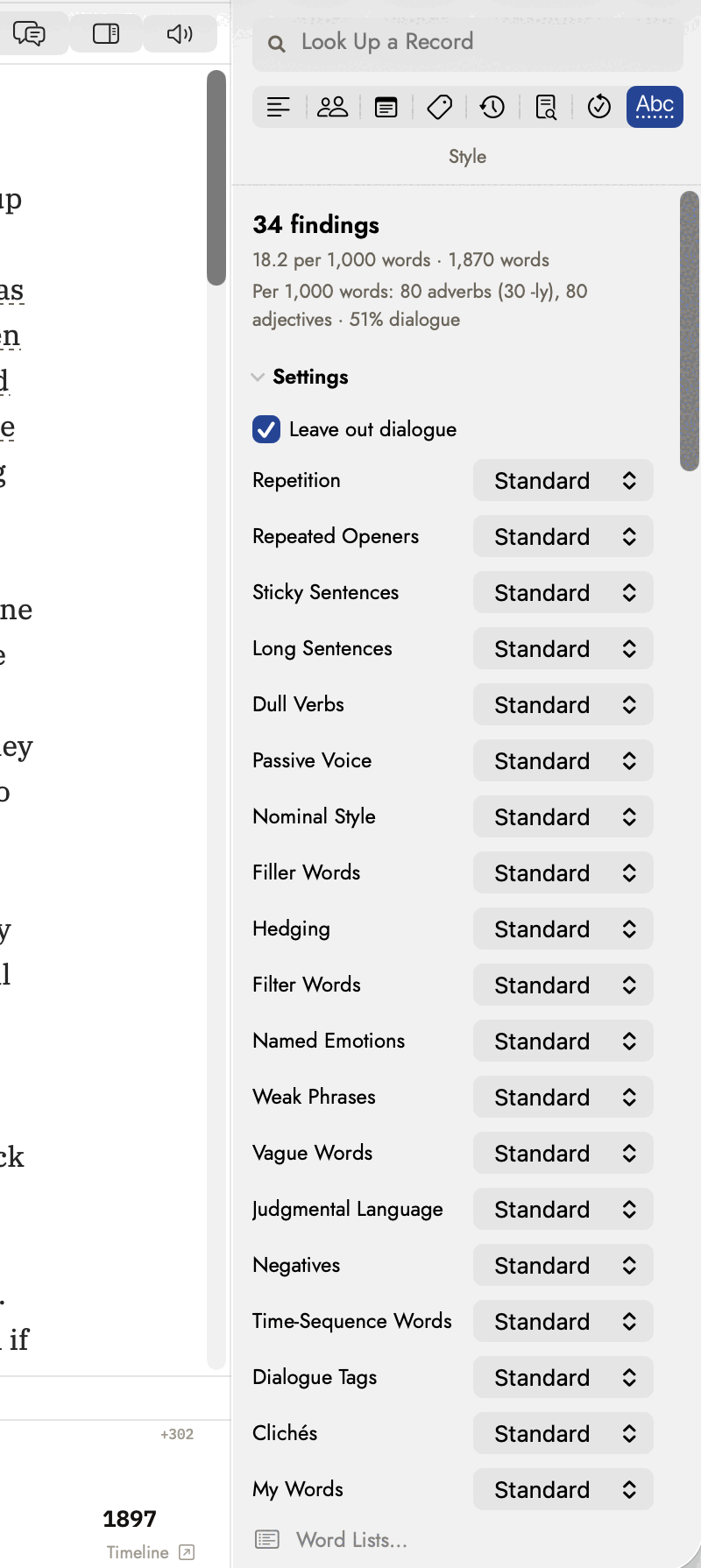 Every kind starts at Standard. The note at the foot is
why two of them find nothing there.
Every kind starts at Standard. The note at the foot is
why two of them find nothing there.
These settings apply to every book on this Mac. The words you import, and the findings you ignore, belong to the book.
Ignoring a finding
Some findings are right about the words and wrong about the sentence. Ignore, on the finding, stops flagging that spot and nothing else: the same words elsewhere are still checked.
The spot is remembered by what it says — the flagged words and a little of the text around them — rather than by where it sits. Editing elsewhere in the section leaves it ignored. Rewriting that sentence brings the finding back, because it's a different sentence now.
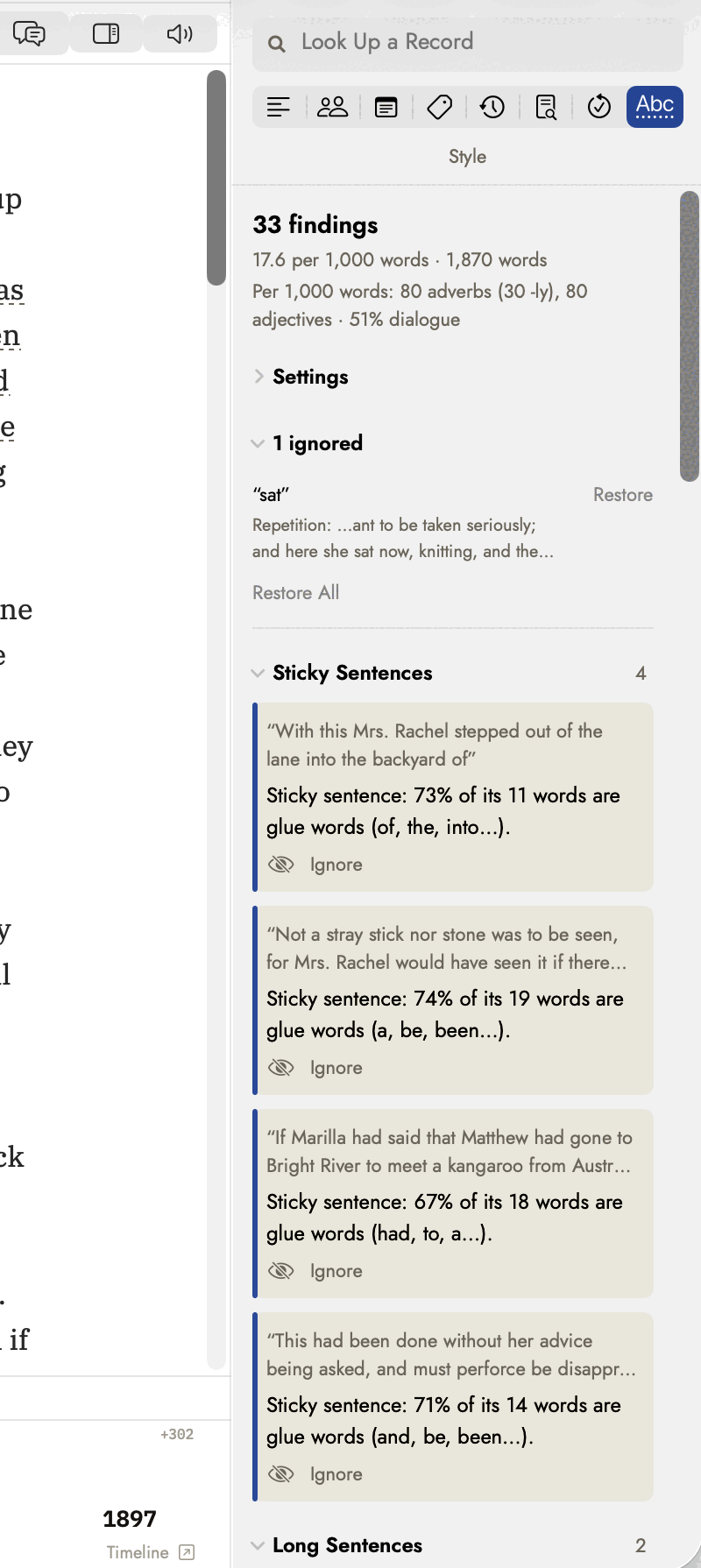 The same scene one finding lighter: 34 became 33, and
the rate with it. The words either side are kept, which is what makes the
ignore survive an edit elsewhere.
The same scene one finding lighter: 34 became 33, and
the rate with it. The words either side are kept, which is what makes the
ignore survive an edit elsewhere.
Ignored findings are listed under Settings as N ignored, each with the words around it. Restore brings one back; Restore All brings back every one in the section. They are saved in the document, so they reach the iPad and go into backups.
Harper also suggests
Under the findings, when there are any, is a group called Harper also suggests. Harper is the offline grammar checker behind the Grammar tab, and some of what it knows is style rather than grammar: a redundancy (past history), a phrase where one word would do, very cold where freezing is waiting.
They aren't counted. The number and rate at the top of the tab are the style check's own findings; Harper's sit below them, outside both. The Style Report is the reason: it runs the style check over every chapter and can't run Harper, so counting these here would make this tab disagree with the report about the same chapter.
No Replace button. The Grammar tab offers Harper's replacement and applies it; this tab points and explains. The same suggestions are on the Grammar tab whenever you want one applied.
To switch them off, silence Style in Settings ▸ Writing's list of Harper categories. That takes the group off this tab too, because the tab asks Harper the same question the Grammar tab does.
Your own word lists
Every list can take words of your own, from a spreadsheet. Choose Tools ▸ Style Check Word Lists…, or Word Lists… under the Style tab's Settings.
- Pick the Category to add to.
- Click Choose CSV File… and pick the file.
- Read the result: what was Added, what the list already had, and what it couldn't use, with the row number and the reason.
The file is one word or phrase per row, up to eight words. A second column
can say gentle, standard or strict;
left blank it's standard. A header row is optional. Save it from your
spreadsheet as CSV (UTF-8).
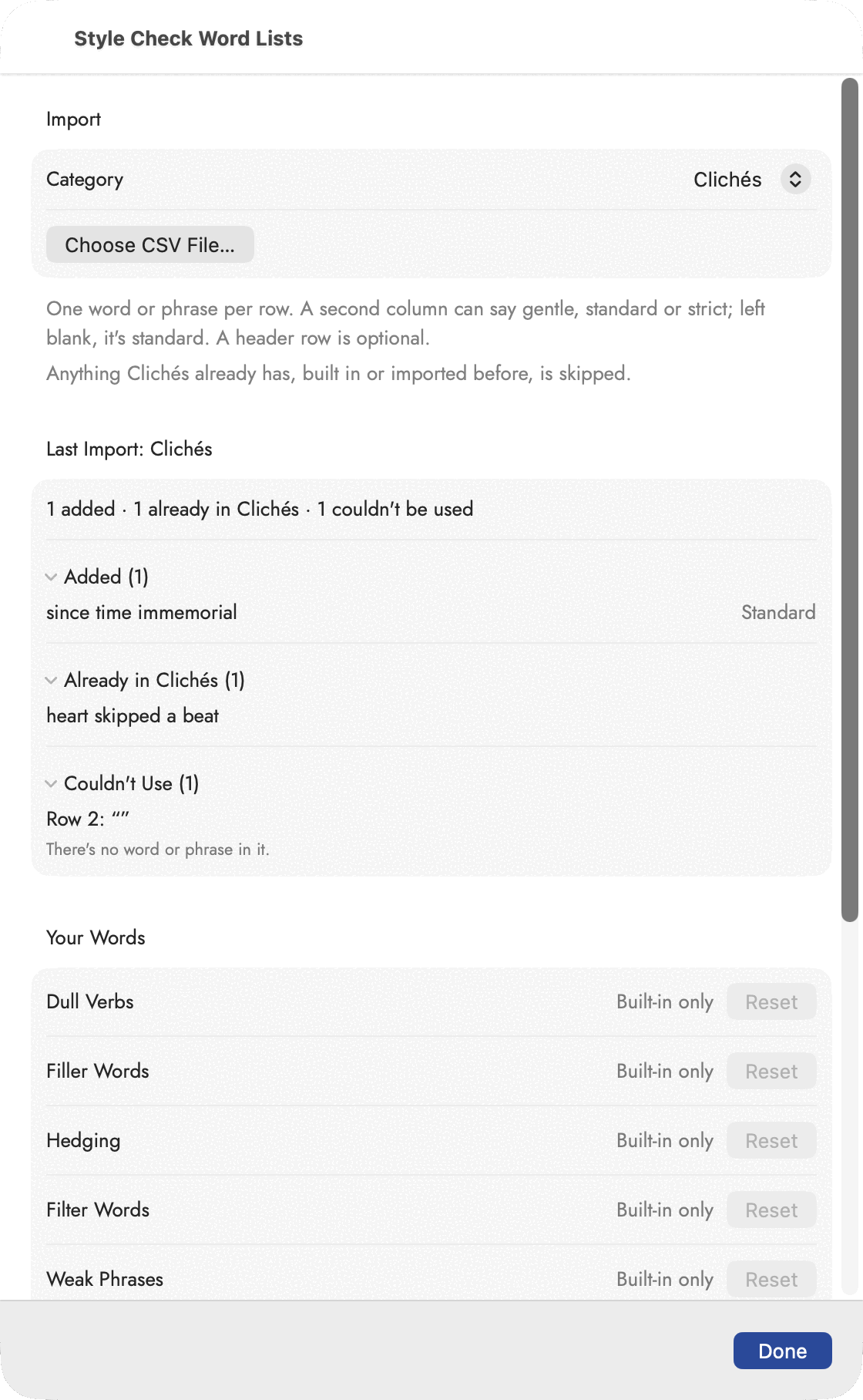 Three rows, one of each answer: a phrase the built-in
list already had, one it didn't, and a row with the phrase missed off, which
is reported rather than passed over. Your Words, underneath, is where words of
your own are taken out again.
Three rows, one of each answer: a phrase the built-in
list already had, one it didn't, and a row with the phrase missed off, which
is reported rather than passed over. Your Words, underneath, is where words of
your own are taken out again.
phrase,strictness
at long last,
all things considered,strict
little by little,gentle- Anything the list already has is skipped, built in or imported before, in any form: "began to" is already there as a form of "begin to".
- Dull Verbs and Filter Words take one verb per row, in any form. "glimpsed" adds glimpse, and every form of it is flagged.
- The rules take no words. Repetition, Repeated Openers, Sticky Sentences, Passive Voice, Nominal Style, Named Emotions and Dialogue Tags read the sentence, so a file imported into one of them is turned away row by row.
- Two marks for patterns.
=wordmatches any form of the word, and*matches any one word, so=wring * handscatches "wrung her hands" and "wringing his hands".
Your Words, at the foot of the sheet, shows how many words you have imported into each list. Reset removes them from one list and Reset All to Built-in Lists… from every list; both ask first. The built-in lists always stay. Your words are saved in the document, so each book can have its own and they travel with it to the iPad.
The Style Report
The Style tab looks at one section. Analysis ▸ Style Report runs the same check over every chapter of the manuscript in the toolbar's Working on picker, or all of them, and ranks the result. It answers the question a revision starts with: where is the work?
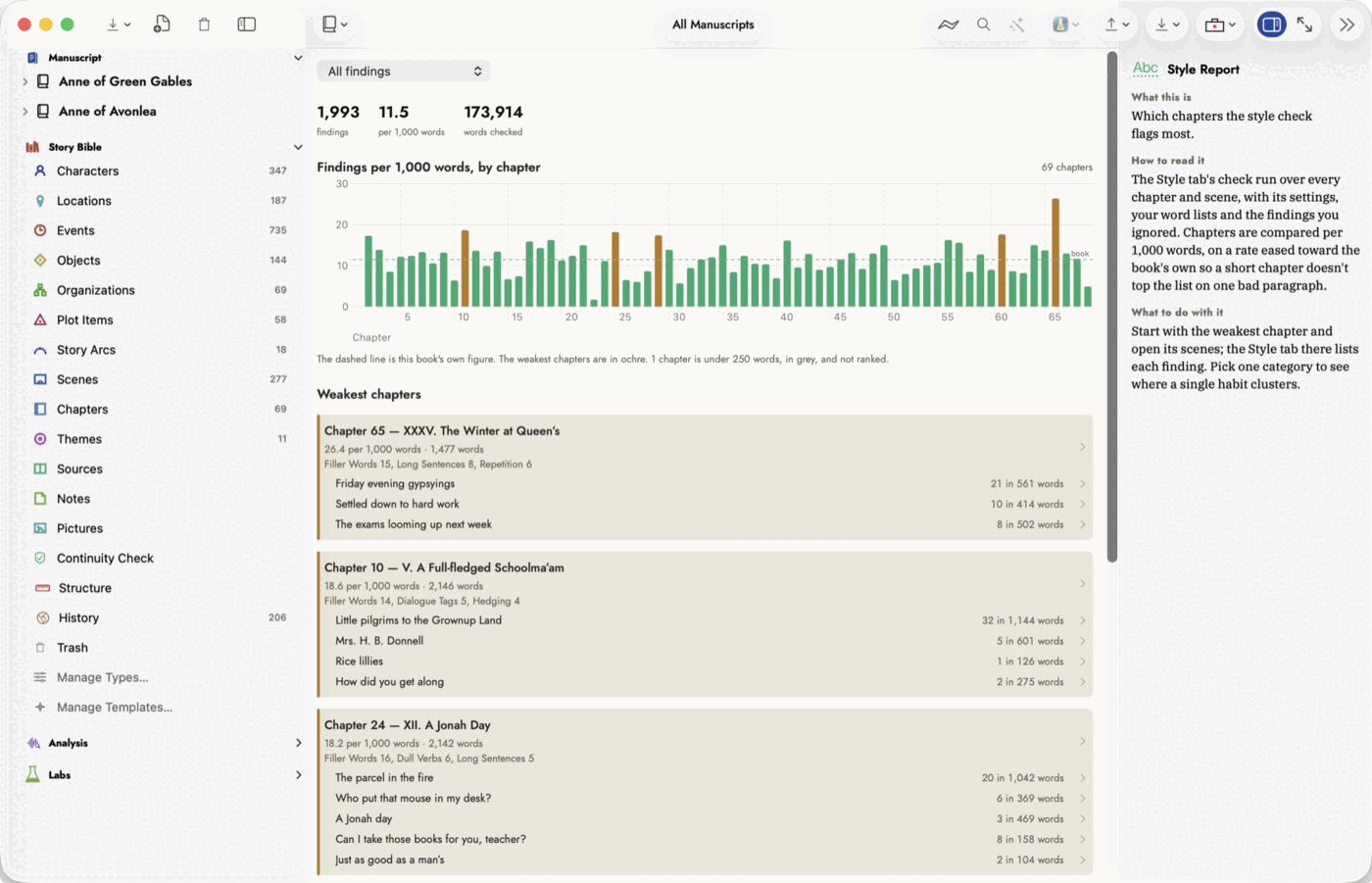 Both Anne books ranked as one run of chapters —
174,000 words, about a second’s work. Every row opens that chapter or
scene.
Both Anne books ranked as one run of chapters —
174,000 words, about a second’s work. Every row opens that chapter or
scene.
- The summary: findings, the rate per 1,000 words, and the words checked.
- The chart: a bar per chapter, in reading order, with the book's own rate as a dashed line. The weakest chapters are in ochre; a chapter under 250 words is grey and isn't ranked, because one paragraph is too little to judge a chapter by.
- Weakest chapters: up to five above the book's rate, each with its rate, its length, its three commonest kinds of finding, and its scenes with their own counts. Every row opens that chapter or scene.
- Every chapter, weakest first: the whole ranking, folded away until you open it.
Short chapters don't top the list on one bad paragraph. The order comes from a rate eased toward the book's: each chapter is treated as if it had another 1,000 words written at the book's average. A long chapter barely moves; a short one needs more than a few findings to stay near the top. The rows show the plain rate, the one you can check against the Style tab, which is why a short chapter can sit below a lower figure.
The menu at the top narrows everything to one kind of finding, or switches to a count: Adverbs, -ly Adverbs and Adjectives per 1,000 words, or Dialogue as a share of the words. With a count chosen, the list names the chapters with the most rather than the weakest.
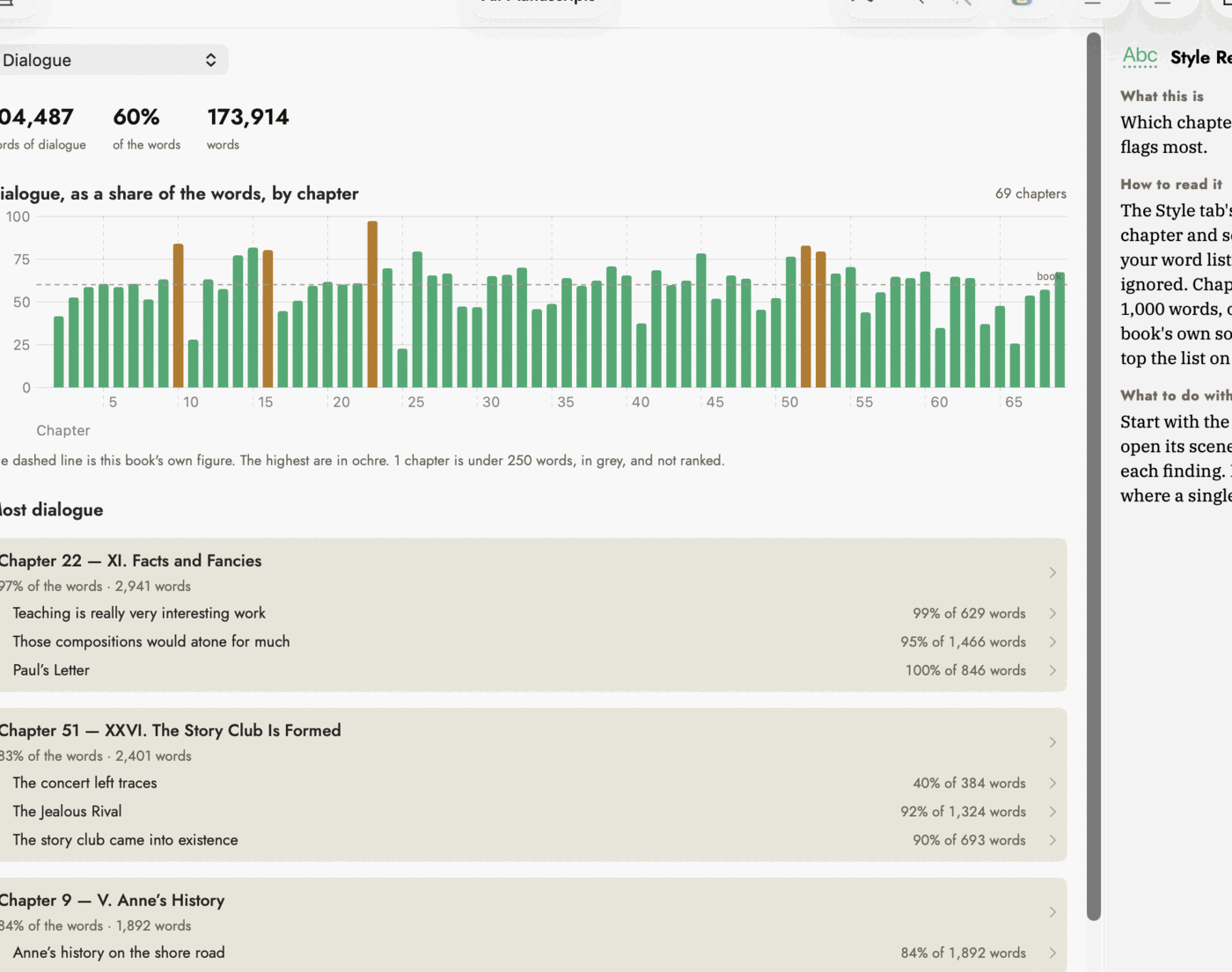 A count says which chapters have more, not which are
weaker, so the list is Most dialogue.
A count says which chapters have more, not which are
weaker, so the list is Most dialogue.
The report uses the Style tab's settings, your word lists and every finding you ignored, so each chapter's figure is what its sections' Style tabs add up to. It checks a section at a time and shows its progress; after that it remembers each section, so an edit re-checks only the section you changed.